
Tutorial: Tax Optimization
Taxes are one of the few investing costs you can actually control.
The Taxes page estimates the capital-gains tax you have generated so far this year, scans your portfolio lot by lot for losses worth harvesting, shows the estimated tax impact of a move before you make it, helps you replace a sold holding without tripping the wash-sale rule, and keeps a running record of everything you have sold. It updates continuously, so you can act on opportunities all year instead of scrambling every December.
What you'll find in this tutorial
You do not have to follow these in order. Click any section to jump straight to it, or open the Taxes page in the app to follow along.
- Read your estimated tax picture
- Check the assumptions behind your rate
- Find tax-loss-harvesting opportunities, lot by lot
- See the tax impact before you act
- Avoid the wash-sale rule
- Track everything you've sold this year
Learn more: How tax optimization works, Common use cases, and Next steps.
Throughout, the red markings on each screenshot point to exactly what the text is describing: a (1) in the text matches the 1 badge on the image. Where the phone layout differs, a mobile screenshot follows the desktop one.
Read your estimated tax picture
Open the Improve menu in the top navigation bar and choose Tax Optimization to open the Taxes page. The Estimated investment tax calculations card is your year-to-date snapshot:
- Your year-to-date estimated tax burden and tax harvesting savings, plus your short-term and long-term capital gains tax so far this year (1).
- Your marginal short-term and long-term rates, each with a View link to the inputs behind them (2).
- Your tax residency, with Edit to correct it (3). Because the estimate depends on it, keep this accurate.
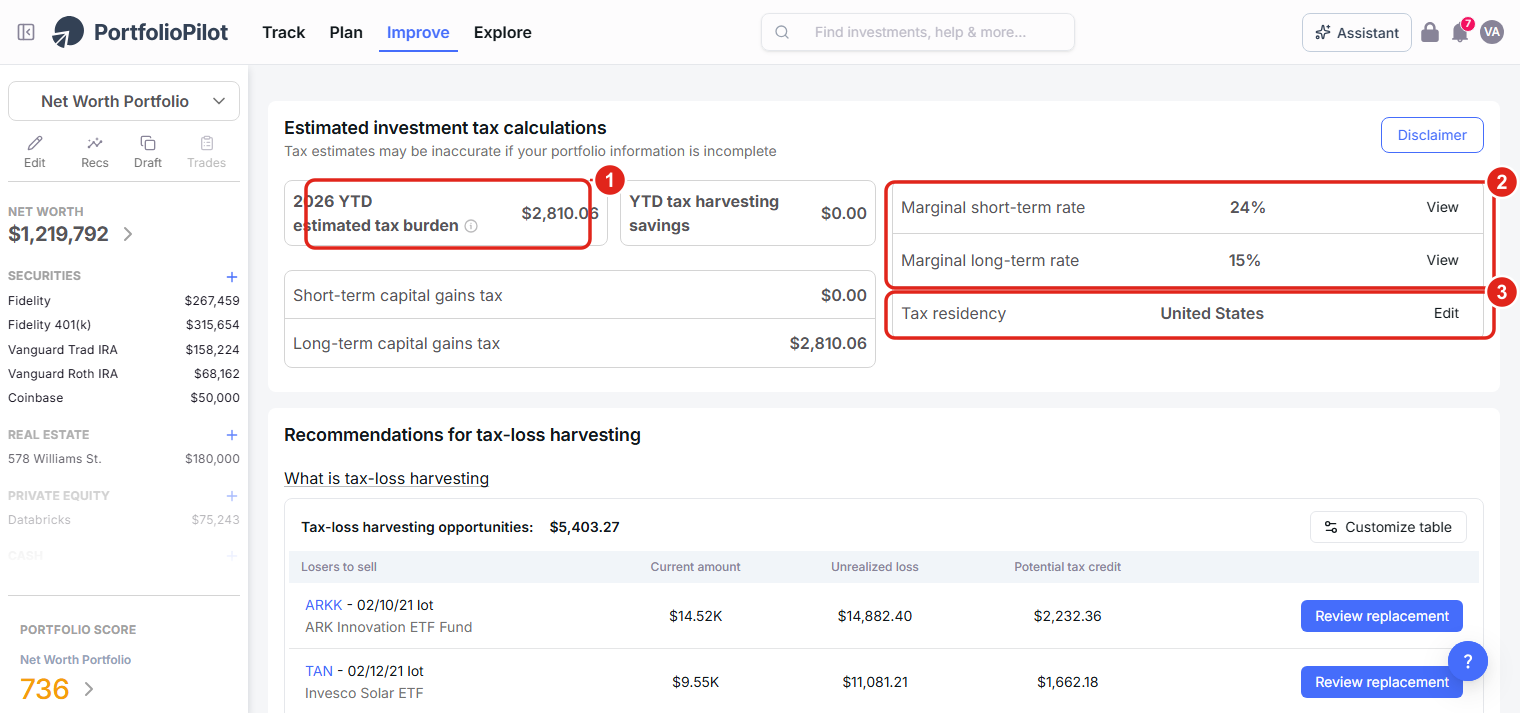
The Taxes page: your year-to-date tax burden (1), marginal rates (2), and tax residency (3), updating as you sell. Figures shown are illustrative.
On a phone, the same card stacks vertically: the tax burden and harvesting savings (1) at the top, then your marginal rates (2) below.
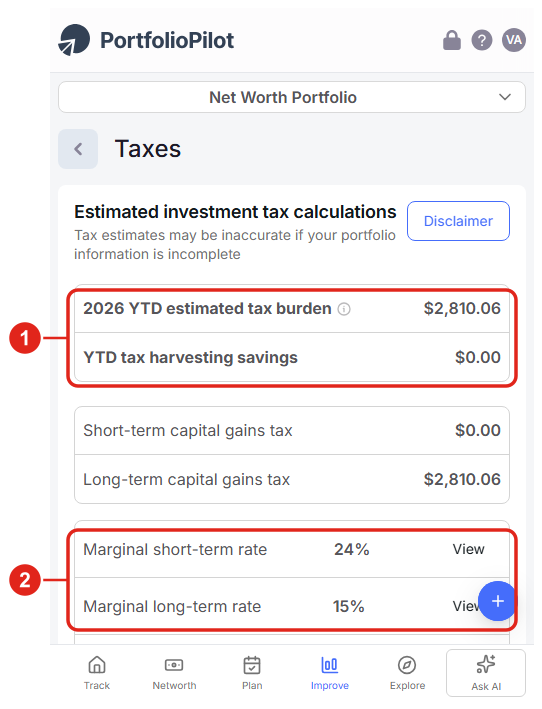
Mobile view: the estimated tax calculations stack vertically. Figures shown are illustrative.
Check the assumptions behind your rate
Select View next to a marginal rate to open Marginal tax rate estimation. It shows exactly what drives your rate: your income, filing status, and country and state of residence, and the resulting short- and long-term rates (1). If anything is off, choose Update investor preferences so every estimate downstream is accurate (2).
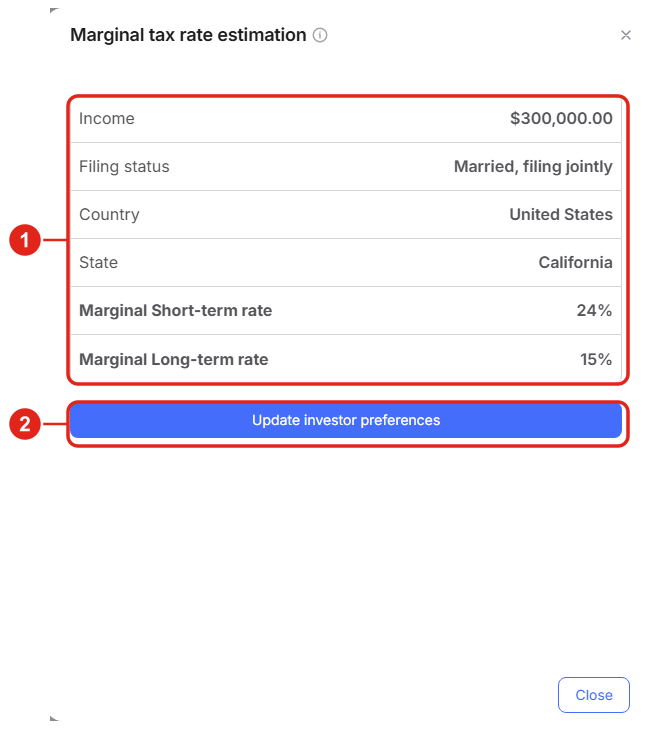
View opens the inputs behind your rate: income, filing status, and residency (1), with Update investor preferences to change them (2). Figures shown are illustrative.
On a phone, the same panel opens full screen: your income, filing status, and residency with the resulting rates (1), and Update investor preferences at the bottom (2).
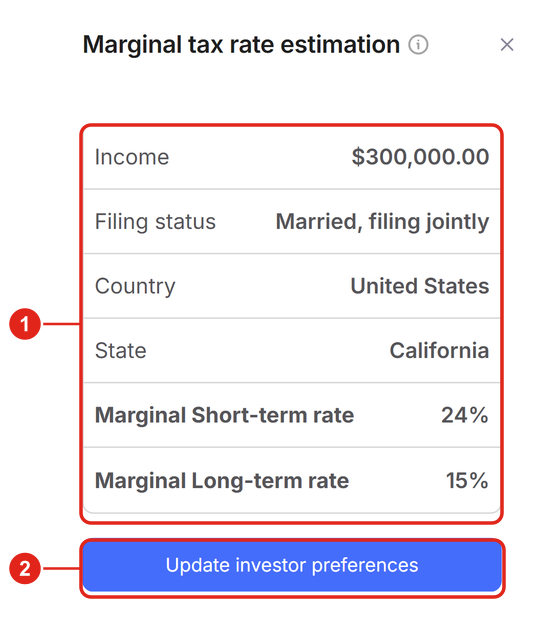
Mobile view: the rate inputs and resulting rates, with Update investor preferences below. Figures shown are illustrative.
Find tax-loss-harvesting opportunities, lot by lot
Tax-loss harvesting means selling a holding worth less than you paid to realize a loss, then using that loss to offset capital gains elsewhere (and up to $3,000 of ordinary income a year, with the rest carried forward). PortfolioPilot scans your portfolio continuously and lot by lot, so opportunities appear in real time rather than only at year-end.
On the Taxes page, scroll to Recommendations for tax-loss harvesting:
- The total tax-loss harvesting opportunities available right now (1).
- Each underwater lot under Losers to sell, with its Current amount, Unrealized loss, and Potential tax credit: the estimated tax benefit, shown before you act (2).
- A Review replacement button to act on a specific lot in a safe draft (3).
Note: externally managed, tax-free, and tax-advantaged accounts are excluded, because they do not benefit from self-directed harvesting, another reason to set the right tax treatment on each account.
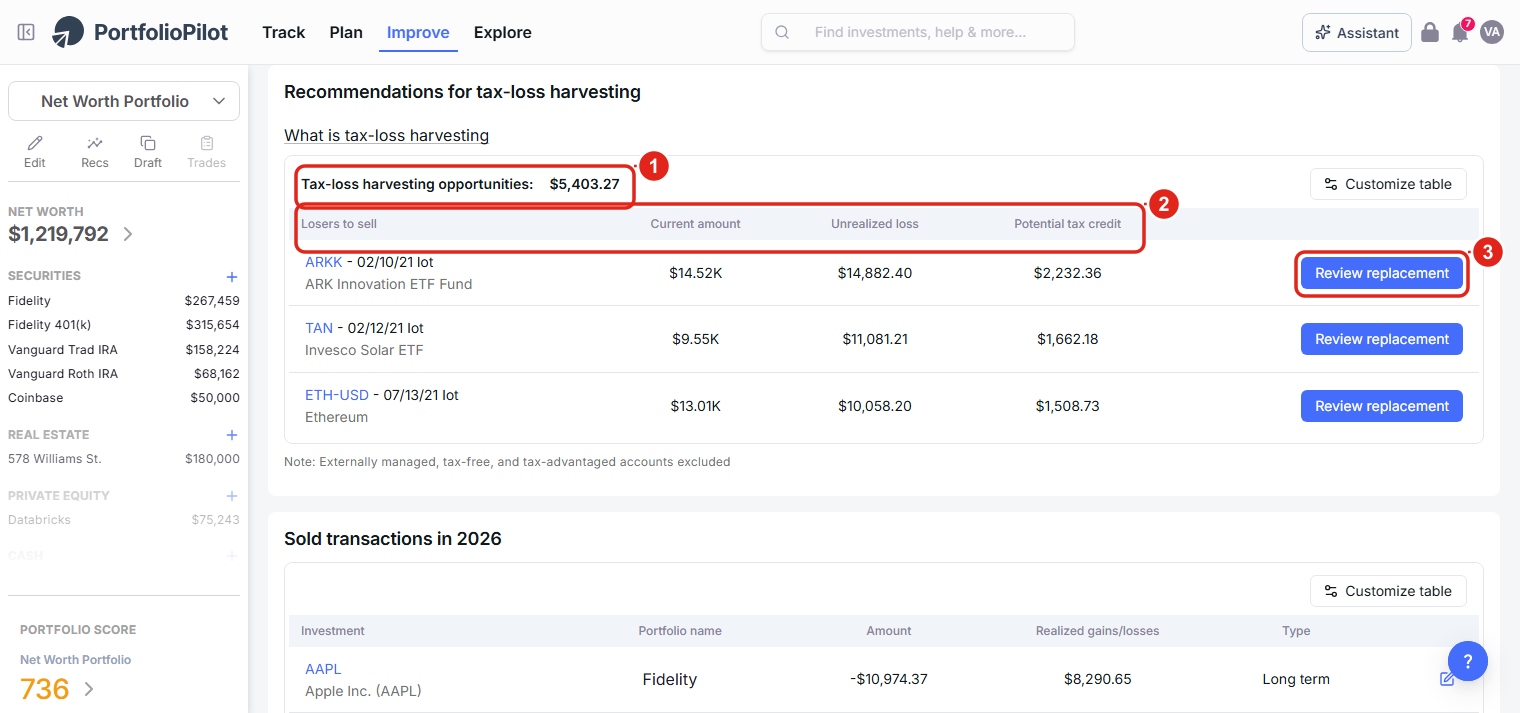
Each underwater lot shows its unrealized loss and Potential tax credit right in the table (1)(2), with Review replacement to act on it (3). Figures shown are illustrative.
On a phone, the table becomes a card per lot: the total opportunity (1) at the top and a Review replacement button on each lot (2).
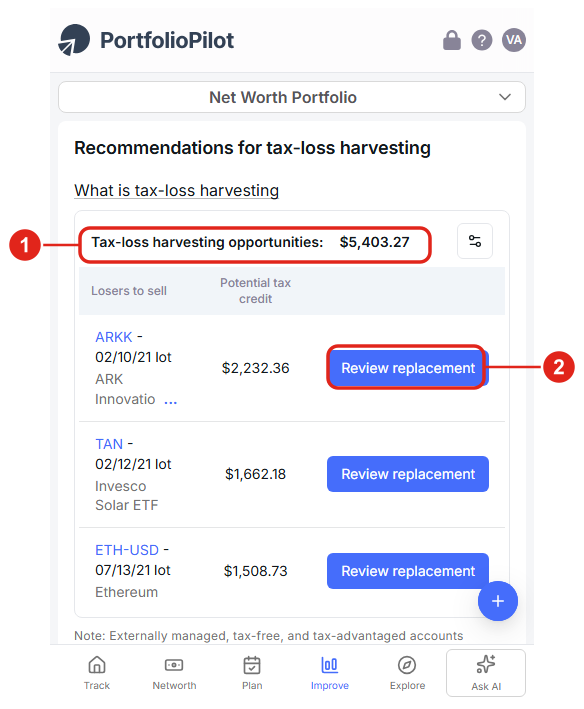
Mobile view: each harvesting opportunity as a card with Review replacement. Figures shown are illustrative.
A worked example (illustrative). Suppose you bought a technology ETF for $12,000 and it is now worth $9,500, a $2,500 unrealized loss, and earlier this year you realized a $2,500 gain elsewhere. Harvesting the ETF realizes the $2,500 loss, which offsets the $2,500 gain, bringing your net taxable gain on those two trades to about $0. At a 15% long-term rate that is roughly $375 of tax you don't pay this year. With no gains to offset, the same loss could instead reduce up to $3,000 of ordinary income, with the rest carried forward. Your actual result depends on your situation. Check the Potential tax credit and consult your tax advisor.
See the tax impact before you act
Choose Review replacement on a lot to open the Sell for tax credit drawer. Before anything happens, it estimates the result:
- The reduction on that holding: its current amount, unrealized loss, and the Potential tax credit the sale would generate (1).
- The amount to sell, pre-filled with the calculated optimal amount, which you can adjust (2).
- A Replacement section to keep your market exposure: search for a similar security and set the amount to buy (3). The sell and the replacement go to a draft portfolio first, so nothing happens at your brokerage until you place the trades yourself.
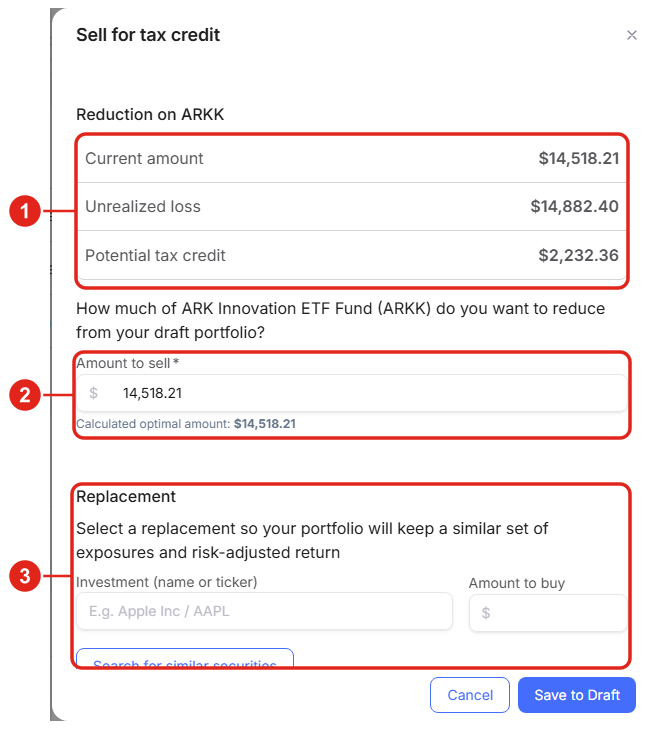
Before you commit, PortfolioPilot estimates the realized loss and tax credit (1)(2) and helps you line up a replacement (3). Figures shown are illustrative.
On a phone, the drawer opens full screen with the same details stacked: the reduction and Potential tax credit (1), the amount to sell (2), and the Replacement search (3).
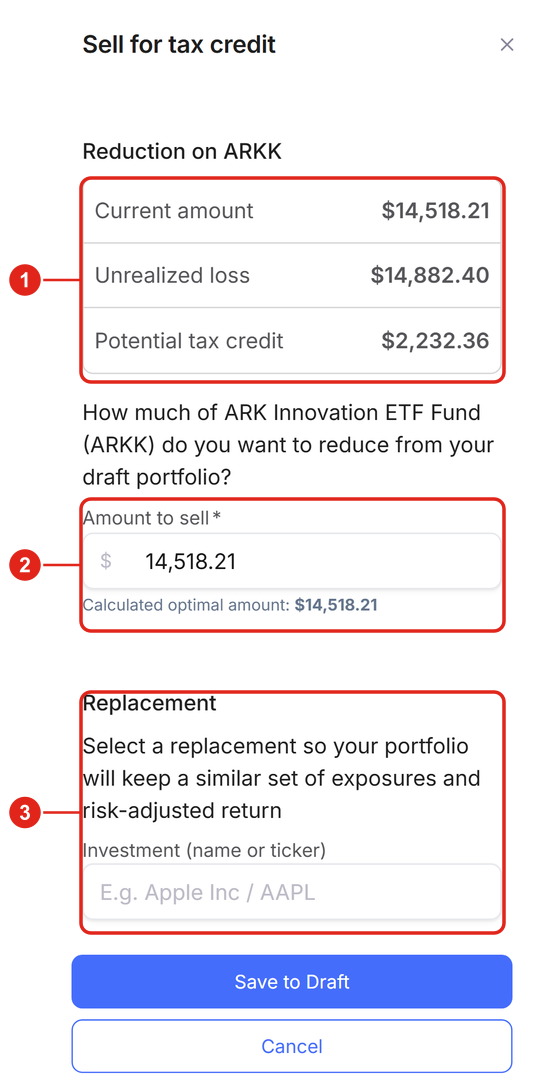
Mobile view: the estimated tax credit, the amount to sell, and the replacement search. Figures shown are illustrative.
Avoid the wash-sale rule
The wash-sale rule is an IRS rule that disallows a tax loss if you buy the same or a substantially identical security within 30 days before or after the sale. If you trip it, the loss isn't deductible now. It is added to the cost basis of the replacement shares instead. The rule can also be triggered by a purchase in another of your accounts, including an IRA, and by automatic dividend reinvestment.
This is what the Replacement step above is for: Search for similar securities surfaces replacements that keep a similar set of exposures and risk-adjusted return without being substantially identical. A practical rule of thumb: swapping one S&P 500 ETF for a different provider's total-market or large-cap ETF generally keeps you invested while preserving the loss; buying back the exact same fund within the window does not. PortfolioPilot surfaces the guidance, but the final call is yours. When in doubt, widen the replacement or wait out the 30 days, and check with your tax advisor.
Track everything you've sold this year
Scroll to Sold transactions for the current year to see a running record of your realized gains and losses:
- Each sale with its Investment, Portfolio name, Amount, Realized gains/losses, and Type (short- or long-term) (1).
- Running totals: Total amount sold and your short- and long-term capital gains tax for the year (2).
- Use Customize table to choose columns (3), and Manage transactions if something looks missing.
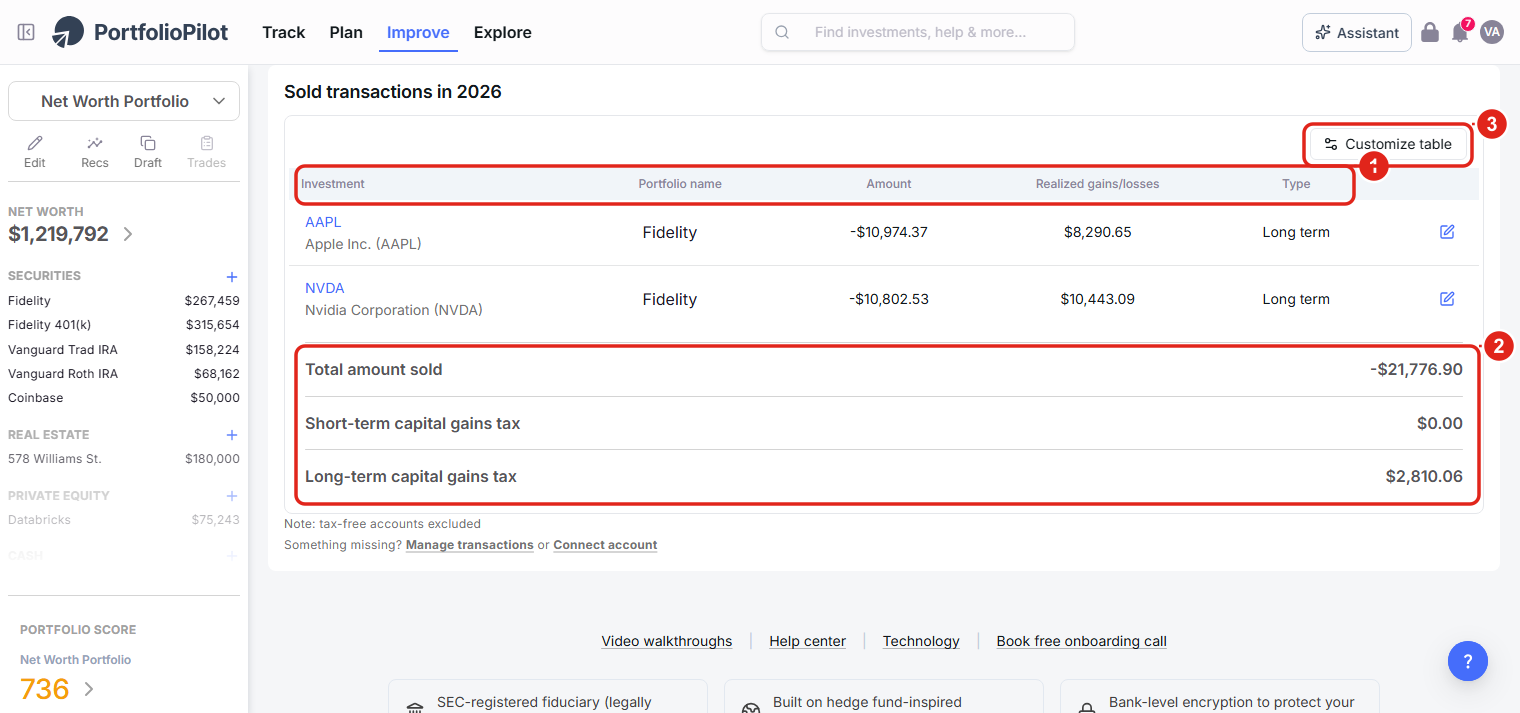
A running list of every sale: investment, amount, realized gain or loss, and short- or long-term type (1), with year-to-date totals (2). Figures shown are illustrative.
On a phone, each sale becomes a card (1), with the same year-to-date totals below (2).
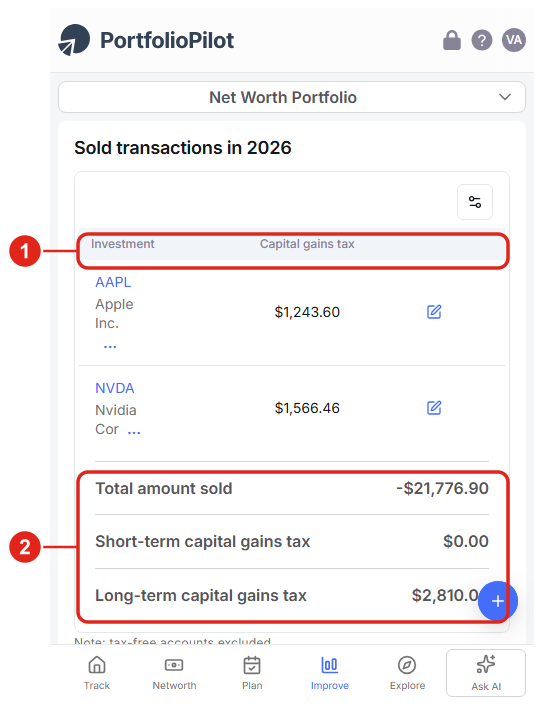
Mobile view: sold transactions as cards with year-to-date totals. Figures shown are illustrative.
The sections that follow, How tax optimization works, Common use cases, and Next steps, are background reading rather than steps to complete.
How tax optimization works
- Continuous, lot-by-lot: instead of a year-end scan, PortfolioPilot re-checks your holdings in real time and flags the specific lots that are underwater and worth harvesting, refreshing as prices move.
- Estimates from your inputs: your capital-gains rate is computed from the income, filing status, and residency you provide; change them on the Taxes page and the estimates update.
- Account-aware: tax-loss harvesting targets taxable, self-directed accounts and excludes tax-free, tax-advantaged, and externally managed ones, so set each account's tax treatment in Asset Groups.
- Draft first: harvests and replacements land in a draft and your Order Execution List; PortfolioPilot never trades for you.
Common use cases
- Offsetting a gain you already took: you sold a position earlier this year for a gain. Before year-end, you check the harvesting recommendations, find lots with about that much loss, confirm the estimated tax credit, and harvest them, netting your realized gains close to zero while staying invested through similar replacements.
- Lowering ordinary income in a flat year: you have no realized gains to offset, but you do have an underwater lot. Harvesting a $3,000 loss lets you deduct up to $3,000 against ordinary income this year, with any extra carried forward.
- Checking the tax cost before you rebalance: before trimming a winner, you use the Taxes page to see the gain the sale would realize and its estimated tax, so you can weigh the tax cost against the rebalancing benefit, or pick a lower-gain lot instead.
Next steps
- Tutorial: Asset Groups. Tag each account's tax treatment so harvesting targets the right accounts.
- Tutorial: Personalized Recommendations. The Optimize taxes strategy surfaces tax-aware moves alongside the rest of your recommendations.
- Tutorial: Draft Portfolio. The safe sandbox where harvests and replacements land before you execute them.
- Tutorial: Retirement Planning. Model Roth conversions and the tax-efficient withdrawal order over your lifetime.
Global Predictions provides investment advice only through its internet-based application, PortfolioPilot, and only to individuals who are advisory clients of Global Predictions pursuant to written advisory Client Agreements ("Advisory Services"). The publicly available portions of the Platform (i.e., the sections of the Platform that are available to individuals who are not party to a Client Agreement, including globalpredictions.com and portions of portfoliopilot.com) are provided for educational purposes only and are not intended to provide legal, tax, or financial planning advice. To the extent that any of the content published on publicly available portions of the Platform may be deemed to be investment advice, such information is impersonal and not tailored to the investment needs of any specific person. Nothing on the publicly available portions of the Platform should be construed as a solicitation or offer, or recommendation, to buy or sell any security. All charts, figures, and graphs on the publicly available websites are for illustrative purposes only. Before investing, you should consider whether any investment, investment strategy, security, other asset, or related transaction is appropriate for you based on your personal investment objectives, financial circumstances, and risk tolerance. You are also encouraged to consult your legal, tax, or investment professional regarding your specific situation. Registration does not imply a certain level of skill or training. Investing involves risk. The value of your investment will fluctuate, and you may gain or lose money.
PortfolioPilot does not provide tax advice. The tax features described here, including capital-gains estimates and tax-loss-harvesting suggestions, are educational and illustrative only, are based on the information you provide, and are not a substitute for advice from a qualified tax professional. Tax rules, including the wash-sale rule, are complex and depend on your individual circumstances; consult your tax advisor before acting.
Case studies presented are hypothetical scenarios and intended for illustrative purposes only. They do not represent an actual client, investment or experience, but rather are meant to provide an example of the intended investment process and methodology. An individual's experience may vary based on his or her circumstances. There can be no assurance that the Firm will be able to achieve similar results in comparable situations. No portion of this case study is to be interpreted as a testimonial or endorsement of the Firm's investment advisory services. The information contained herein should not be construed as personal investment advice.
The contents of the Platform may contain forward-looking statements that are based on management's beliefs, assumptions, current expectations, estimates, and projections. Forward-looking statements are not guarantees of future performance and actual results may differ materially from those anticipated.
Note: our use of the term AI refers to all artificial intelligence models used including large language models, proprietary economic models that incorporate regression or dynamic factors, and machine learning methods like supervised learning. For more information, see our disclosures at globalpredictions.com/disclosures.
The Taxes page and your sold-transaction history are part of the free plan. Tax-loss-harvesting recommendations and deeper optimization such as investing recommendations are available with Gold, Platinum, or Pro (all with a 10-day free trial, no credit card required). Confirm the exact plan tier on the pricing page before you rely on it.
