
Tutorial: Custom Securities & Proxies
PortfolioPilot recognizes a very large universe of securities automatically, but no database covers everything: a proprietary fund, a certain ADR, a brand-new listing, or a private holding may not be found. And even for a security it does track, you may hold a different view of the assumptions behind it. This tutorial shows you how to add a custom security PortfolioPilot doesn't recognize, modify the assumptions on one it does, attach a proxy so an untracked holding is analyzed like a similar recognized ticker, and keep all of it accurate over time, so every analysis and recommendation reflects what you actually own.
What you'll find in this tutorial
You do not have to follow these in order. Click any section to jump straight to it, or open your Net Worth page in the app to follow along.
- Add a custom security when a ticker isn't recognized
- Modify a recognized security's assumptions
- Use a proxy to borrow a similar security's assumptions
- Keep your custom and proxy securities accurate over time
Learn more: How customization works, Common use cases, and Next steps.
Throughout, the red markings on each screenshot point to exactly what the text is describing: a (1) in the text matches the 1 badge on the image. Where the phone layout differs, a mobile screenshot follows the desktop one.
Add a custom security when a ticker isn't recognized
Use this when you hold something PortfolioPilot doesn't recognize and there's no close public ticker to track: a local credit union certificate, a proprietary or private fund, or a brand-new listing.
- Open Add an asset in the top navigation bar (or go to your Net Worth page, Securities section, and choose to enter holdings manually). In Enter security, type the name or ticker.
- When there's no match, choose Add custom security to open the slideover. Enter a Name, a short-hand Ticker (no spaces, just a label so you can find it later), and the Amount (Market Value) (1)(2).
- Fill in the assumptions PortfolioPilot should use: 1-year expected returns, Risk (annualized volatility), Dividend Yield, and the classification (Asset class, Country, Sector) (3).
- Choose Save (4). The custom security now counts toward your net worth and is included in your analysis.
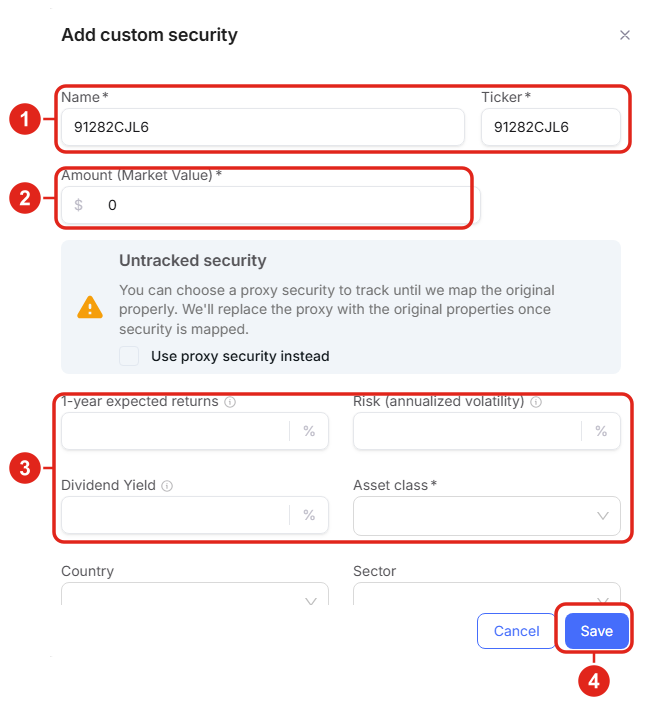
Add custom security: a name, a short-hand ticker, a dollar amount (1)(2), the assumptions PortfolioPilot should use (3), then Save (4). The same panel offers a proxy option, covered below. Figures shown are illustrative.
Hypothetical Example: You hold a $25,000 certificate at a local credit union that isn't in any public database. You add it as a custom security, classify it as fixed income, and enter the certificate's yield as the expected return, so your fixed-income exposure is complete and your Portfolio Score reflects it.
Modify a recognized security's assumptions
Use this when PortfolioPilot already tracks a holding but you want to override its default assumptions, because you hold a different view, or to fix a specific issue or fill in missing data.
- Open the holding's Details (click it anywhere it appears: your holdings list or the net-worth heatmap), then choose Edit security.
- The drawer shows the security's current assumptions. Adjust the ones you want, such as the 1-year expected returns (2). For a recognized security, the Something wrong? notice also offers a proxy as an alternative (1). See the next section.
- Choose Save (3). The analysis recalculates using your inputs.
How to tell a security has been modified: a modified security shows an asterisk (*) next to its ticker everywhere it appears, so you always know which holdings use your custom assumptions. To revert, open it again and choose Reset this security to original.
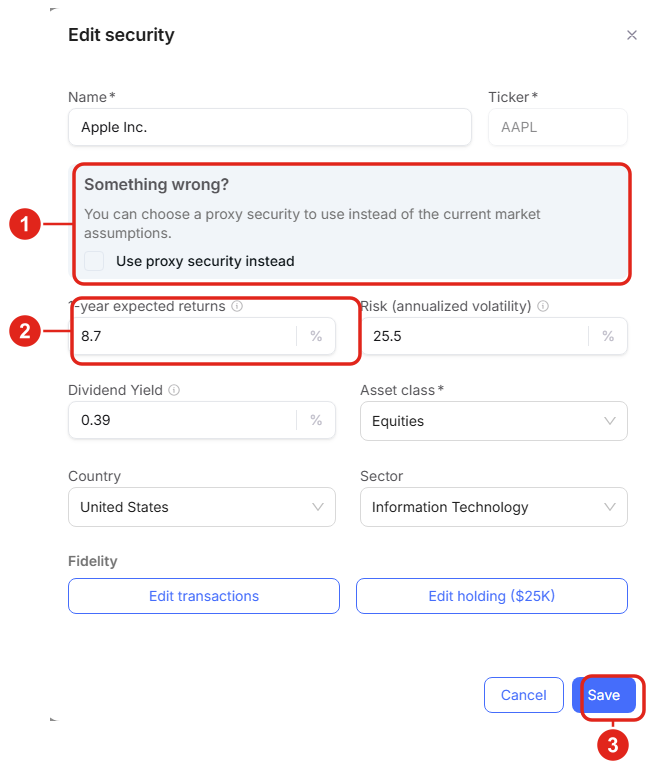
Editing a recognized security: override the 1-year expected returns or other assumptions (2); the Something wrong? notice (1) offers a proxy instead; Save to apply (3). A modified security then carries an asterisk (*). Figures shown are illustrative.
On a phone, the same drawer opens full-screen, with the Something wrong? notice (1) and the editable assumptions (2) stacked.
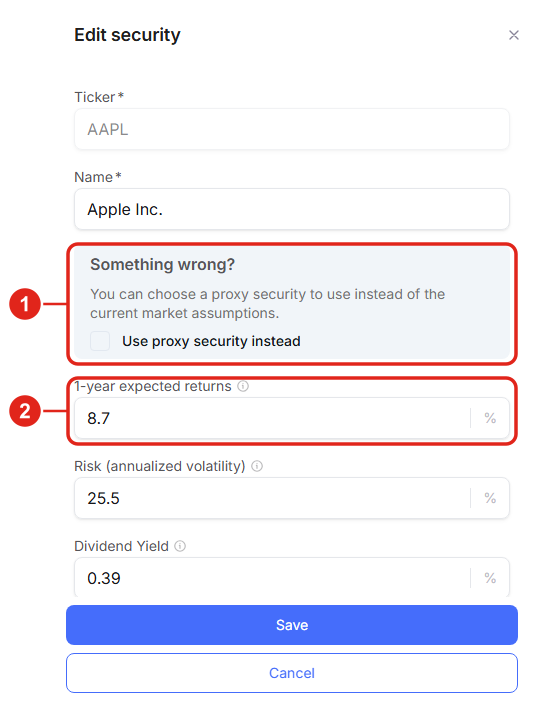
Mobile view: the Edit security drawer full-screen. Figures shown are illustrative.
Hypothetical Example: You believe technology will outperform PortfolioPilot's default assumptions. You open a tech holding, raise its 1-year expected return to match your view, and save. The holding now shows an asterisk, and your Portfolio Score, projections, and recommendations reflect your assumption instead of the default.
Use a proxy to borrow a similar security's assumptions
Use a proxy when PortfolioPilot doesn't recognize a ticker but a similar, recognized security would model it well: a proprietary fund that mirrors a public index, or a foreign-listed share or ADR that tracks a company PortfolioPilot already covers. The proxy's expected return, risk, and dividend assumptions stand in for the untracked holding.
- In the Something wrong? notice (or the Untracked security notice when you're adding an unknown holding), check Use proxy security instead (1).
- A Proxy name or ticker search appears. Enter a similar recognized ticker (for example VOO for an S&P 500 fund, or the U.S.-listed ticker for a foreign share) and select it (2).
- Choose Save. PortfolioPilot now analyzes the holding using the proxy's assumptions until it can map the original.
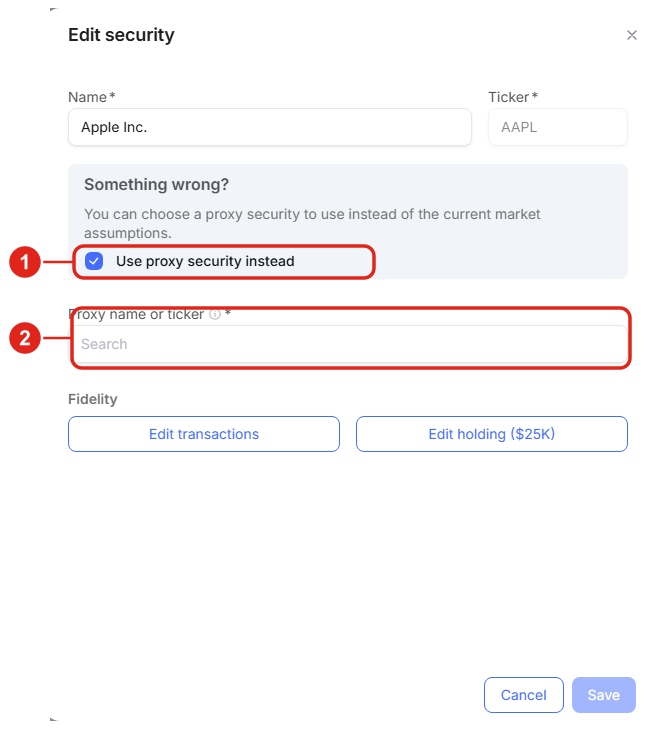
Checking Use proxy security instead (1) reveals a search for a similar recognized ticker (2) whose assumptions are used for the untracked holding. Figures shown are illustrative.
Hypothetical Example (unrecognized ADR): You hold an ADR for a large European company that PortfolioPilot doesn't list under the symbol on your statement. You add it, check Use proxy security instead, and choose the company's recognized listing (or a close ETF) as the proxy, so its return, risk, and dividend behavior are modeled realistically instead of with a flat default.
Keep your custom and proxy securities accurate over time
Custom inputs are a snapshot of what you knew when you entered them, so a little upkeep keeps your analysis trustworthy:
- Proxies are temporary by design: the notice states PortfolioPilot will replace the proxy with the original's properties once the security is mapped, so re-check a proxied holding occasionally to confirm whether the original is now tracked.
- Update the market value: a custom security's value doesn't sync from a brokerage, so update its Amount (Market Value) yourself when it changes.
- Revisit your assumptions: if you modified a security's expected return or risk to reflect a view, revisit it when your view changes. The asterisk (*) next to the ticker is your reminder that the holding uses custom assumptions.
- Reset when appropriate: if you no longer want a custom assumption, open the security and choose Reset this security to original to return to PortfolioPilot's defaults.
- For accurate cost basis over time, keep a custom holding's buys and sells current on the Transactions page.
The sections that follow, How customization works, Common use cases, and Next steps, are background reading rather than steps to complete.
How customization works
- It only changes PortfolioPilot's analysis: adding, modifying, or proxying a security changes how it is analyzed inside PortfolioPilot, never anything at your brokerage. PortfolioPilot has read-only access and never trades for you.
- Your inputs, not forecasts: expected-return, risk, and dividend values you enter are your own assumptions, not PortfolioPilot predictions; they flow into your Portfolio Score, exposures, and recommendations.
- Proxies are a bridge: a proxy borrows a recognized security's assumptions while the original is untracked, and is replaced automatically once PortfolioPilot maps the original.
Common use cases
A holding your brokerage shows but PortfolioPilot can't find: add it as a custom security and either enter sensible assumptions or attach a proxy, so it's counted instead of dropped from your analysis.
A view that differs from the default: modify a recognized holding's 1-year expected return to your number; the asterisk reminds you it's your view, and Reset puts it back whenever you want the default again.
An ADR or foreign listing under an unfamiliar symbol: add it and proxy it to the company's recognized listing or a close ETF, so its risk and return are modeled realistically rather than with a flat placeholder.
Next steps
- Tutorial: Import Your Net Worth. The hub for getting every account into PortfolioPilot in the first place.
- Tutorial: Asset Groups. Once your holdings are accurate, group them by tax treatment so recommendations target the right accounts.
- Tutorial: Personalized Recommendations. See how the assumptions you set here feed the recommendations PortfolioPilot makes.
- Tutorial: Draft Portfolio. Model changes to a customized portfolio in a safe sandbox before acting.
Global Predictions provides investment advice only through its internet-based application, PortfolioPilot, and only to individuals who are advisory clients of Global Predictions pursuant to written advisory Client Agreements ("Advisory Services"). The publicly available portions of the Platform (i.e., the sections of the Platform that are available to individuals who are not party to a Client Agreement, including globalpredictions.com and portions of portfoliopilot.com) are provided for educational purposes only and are not intended to provide legal, tax, or financial planning advice. To the extent that any of the content published on publicly available portions of the Platform may be deemed to be investment advice, such information is impersonal and not tailored to the investment needs of any specific person. Nothing on the publicly available portions of the Platform should be construed as a solicitation or offer, or recommendation, to buy or sell any security. All charts, figures, and graphs on the publicly available websites are for illustrative purposes only. Before investing, you should consider whether any investment, investment strategy, security, other asset, or related transaction is appropriate for you based on your personal investment objectives, financial circumstances, and risk tolerance. You are also encouraged to consult your legal, tax, or investment professional regarding your specific situation. Registration does not imply a certain level of skill or training. Investing involves risk. The value of your investment will fluctuate, and you may gain or lose money.
Specific securities or tickers referenced or displayed in the graphics herein (for example, proxy or replacement tickers) are for illustrative purposes only and do not represent investment decisions or recommendations made by Global Predictions. Any expected-return, risk, or dividend assumptions entered for a custom or modified security are user inputs, not forecasts by PortfolioPilot, and they change the analysis shown.
Case studies presented are hypothetical scenarios and intended for illustrative purposes only. They do not represent an actual client, investment or experience, but rather are meant to provide an example of the intended process and methodology. An individual's experience may vary based on his or her circumstances. There can be no assurance that the Firm will be able to achieve similar results in comparable situations.
Note: our use of the term AI refers to all artificial intelligence models used including large language models, proprietary economic models that incorporate regression or dynamic factors, and machine learning methods like supervised learning. For more information, see our disclosures at globalpredictions.com/disclosures.
Adding, modifying, and proxying your own securities is available on every plan, including Free, so you can always keep your portfolio accurate. The personalized recommendations and deeper analysis that use these inputs are available to Gold, Platinum, or Pro subscribers, all with a 10-day free, no-credit-card trial. Confirm the exact tiers on the pricing page before relying on them.
