
Tutorial: Adding Bonds, Options, Annuities, and Other Hard-to-Track Holdings
Most portfolios hold more than stocks and ETFs: individual bonds, Treasuries and CDs, options and hedges, annuities, pensions, and debt. And these are exactly the holdings a brokerage connection often misses or imports incompletely.
This tutorial shows you how to add each one by hand so it counts toward your net worth, your Portfolio Score, Custom Securities & Proxies, and your recommendations, and what to do when PortfolioPilot does not recognize a security.
What you'll find in this tutorial
You do not have to follow these in order. Click any section to jump straight to it, or open your Net Worth page in the app to follow along.
- Before you start
- Add an individual bond, Treasury, or CD
- Add options, covered calls, and hedges
- Add annuities, pensions, and debt
- When a security is not recognized
- How these holdings show up in your net worth, score, and risk
- Common use cases
Learn more: Why this matters and Next steps.
Throughout, the red markings on each screenshot point to exactly what the text is describing: a (1) in the text matches the 1 badge on the image. Where the phone layout differs, a mobile screenshot follows the desktop one.
Before you start
Good to know: PortfolioPilot models every holding from a small set of inputs: a market value, an expected return, a risk (volatility) figure, a dividend or income yield, and a classification (asset class, country, and sector or bond type). It does not ask for a bond's coupon and maturity, or an option's strike and expiration, as separate fields.
For securities it recognizes, these analytics are built in; for anything you add by hand, you provide the value and a few sensible assumptions, and PortfolioPilot analyzes the holding from those.
- Have your accounts in PortfolioPilot: if you have not added your holdings yet, import your net worth first: connect an account, upload a statement, paste a list, or add holdings by hand. This tutorial picks up where that one leaves off, for the holdings that an import does not capture cleanly.
- Have the basics of the holding handy: its current market value, and (if you know them) a reasonable expected return or yield and a risk level. For a recognized security, just the ticker or identifier is enough.
- Decide where it lives: your Net Worth page groups holdings into categories. Securities (1) covers stocks, bonds, ETFs, and options; Other assets (2) covers annuities, pensions, and loans; a mortgage goes under Real estate. Each category has its own + to start adding.
- You stay in control: PortfolioPilot has read-only access to your linked accounts and never places trades; adding or customizing a holding changes only how it is analyzed inside PortfolioPilot, not anything at your brokerage or insurer.
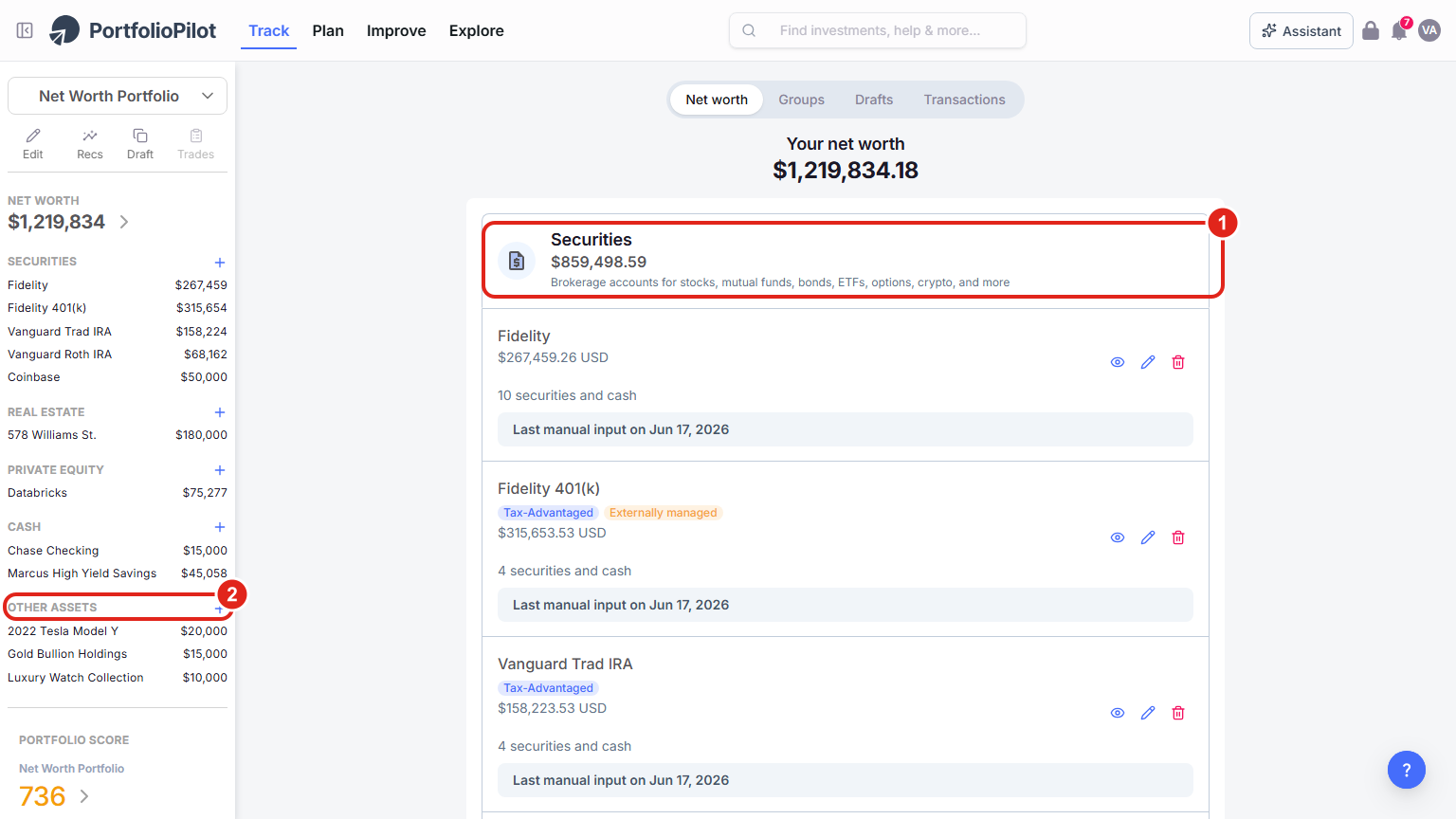
Your Net Worth page groups holdings by category. Securities (1) is the home for stocks, bonds, ETFs, and options; Other assets (2) is for annuities, pensions, and loans. Figures shown are illustrative.
On a phone, the same categories stack vertically. The Securities card (1) shows what it covers, and the + button at the bottom right opens the add flow.
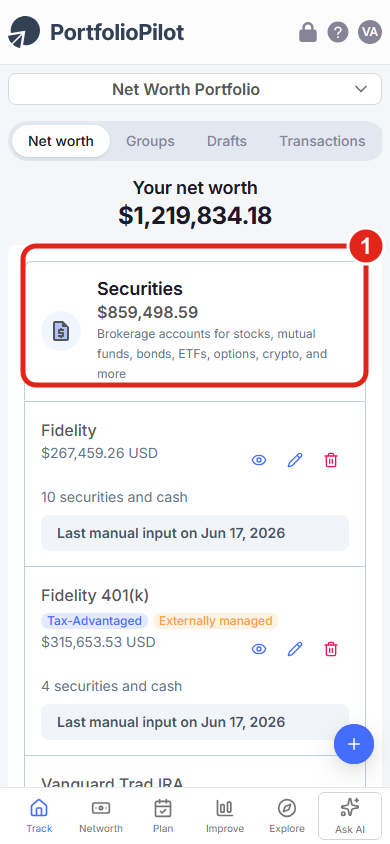
Mobile view: the Securities card lists bonds, ETFs, and options among what it covers. Figures shown are illustrative.
Add an individual bond, Treasury, or CD
Use this for a single fixed-income holding your brokerage did not bring in: an individual Treasury, a municipal or corporate bond, or a brokered CD. There are two cases.
If PortfolioPilot recognizes it
Many bonds and Treasuries are in the database and can be found by their identifier (such as a CUSIP) or name. Add them like any other security and PortfolioPilot brings in its own analytics for the holding.
- Open the add-security flow: on your Net Worth page, choose the + next to Securities to open Add an account. You can search for your institution to connect it, or choose Other ways to import securities (1) to add holdings by hand.
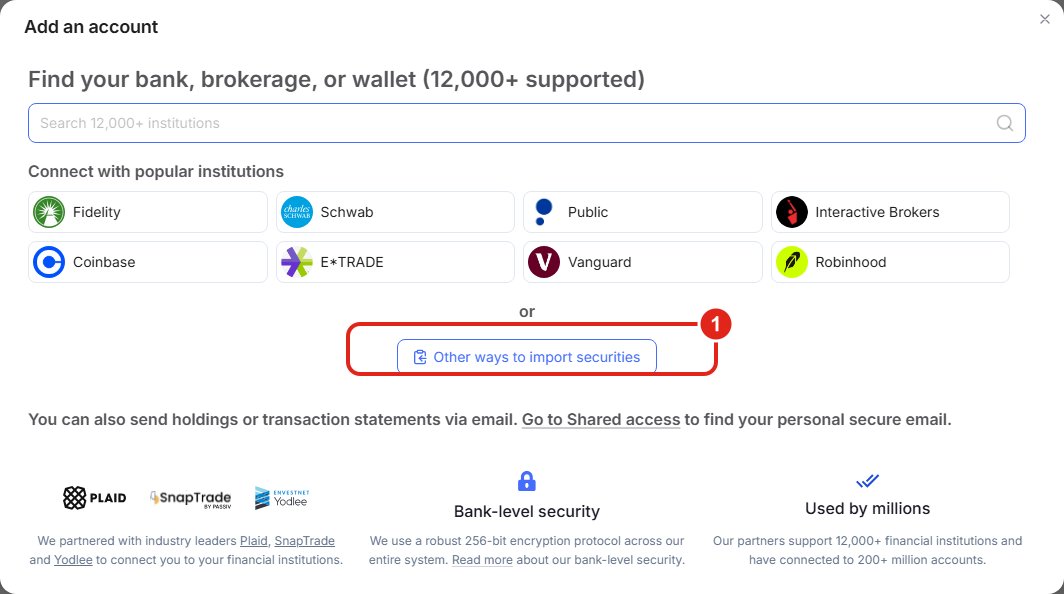
From the Securities flow you can connect an account or, with Other ways to import securities (1), add a holding by hand. Figures shown are illustrative.
- Pick how to add it: other ways to import securities opens a short menu. To add one bond by hand, choose Copy / paste (1) to enter it as plain text, or Enter manually (2) to add securities one by one.
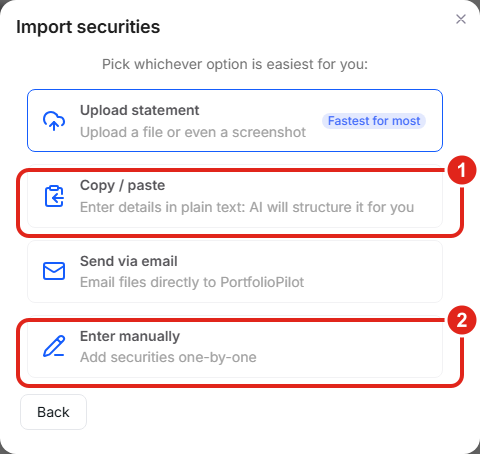
Choose Copy / paste (1) or Enter manually (2) to add a single bond or option by hand. Figures shown are illustrative.
- Search for the bond: in the Enter security (1) field, type the identifier or name. If PortfolioPilot finds it, select it and enter the amount you hold; its analytics come along automatically.
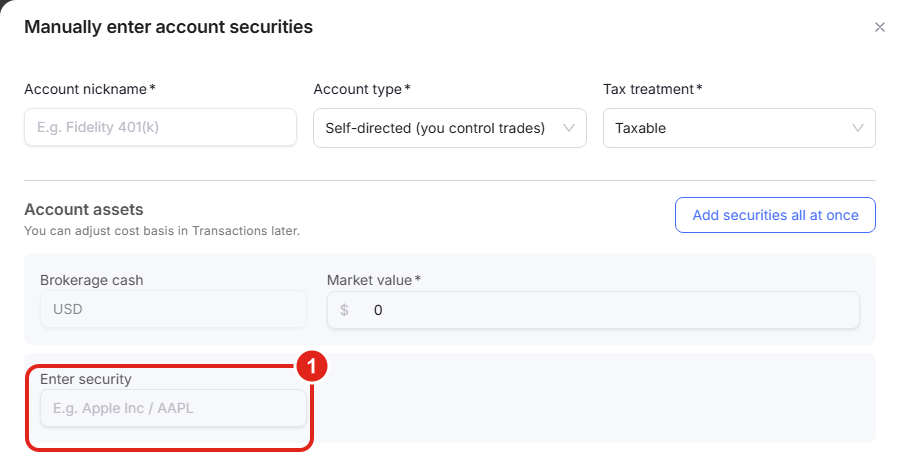
In the manual securities screen, type the bond's identifier in the Enter security (1) field. Figures shown are illustrative.
If PortfolioPilot does not recognize it
If there is no match, choose Add custom security to open the slideover, then record the bond with the fields available.
- Name and amount: enter a Name and a short-hand Ticker (1), the bond's CUSIP works well as both, and the Amount (Market Value) (2), the current market value of your position, not its face value.
- Enter yield and risk as assumptions: in the assumptions grid (3), use 1-year expected returns to represent the bond's expected yield, Dividend Yield for its coupon income, and Risk (annualized volatility) for how much its price moves (a short Treasury is low; a long-dated or high-yield bond is higher). Set Asset class to Fixed Income, and the Sector field becomes Type of bond (Government, Corporate, or Municipal). Set the Country as well.
- Save: choose Save (4). The bond now counts toward your net worth and your fixed-income exposure.
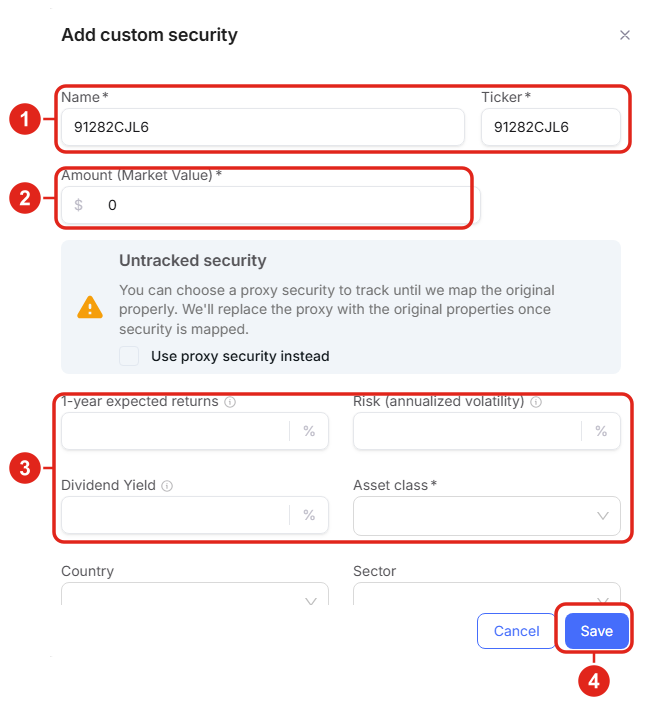
Recording a Treasury PortfolioPilot does not recognize as a custom security: Name and Ticker (1), Amount (2), the assumptions grid (3), and Save (4). Identifier and values are illustrative.
On a phone, the add and edit security screens open full-screen with the same fields, including the Use proxy security instead option and the expected-return, risk, and dividend inputs.
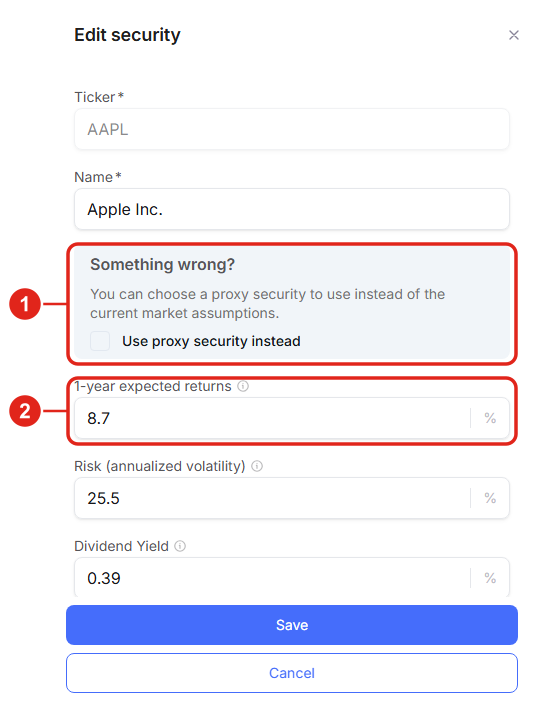
Mobile view: the security drawer is full-screen, with the proxy option (1) and the assumption inputs (2). Figures shown are illustrative.
A note on yield, duration, and maturity: PortfolioPilot analyzes fixed income through expected return, income yield, and risk rather than asking you to enter a coupon, maturity date, or duration. For bonds it recognizes, those analytics are built in; for one you add by hand, the expected return and risk you set are how its yield and interest-rate sensitivity are reflected.
If you want a closer model of a specific bond, attach a proxy (see When a security is not recognized) to a recognized bond or bond ETF with a similar maturity and credit quality.
Example: You buy a $25,000 brokered CD that your brokerage does not report to PortfolioPilot. You add it as a custom security, set the amount to $25,000, Asset class to Fixed Income, Type of bond to Government (or Corporate, matching the issuer), enter the CD's rate as both the expected return and the dividend yield, and a low risk figure. Your cash-and-fixed-income picture and your Portfolio Score now reflect it.
Add options, covered calls, and hedges
PortfolioPilot does not have a dedicated options screen today: there is no field for a strike price, expiration, or call/put. That does not mean you have to leave these positions out.
You record them the same way as any custom holding, by their current market value and a few assumptions, so they still show up in your net worth and feed your analysis. Be deliberate about the assumptions, because an option behaves very differently from the stock underneath it.
A standalone option position
- Add it as a custom security from the Securities flow, the same way as an unrecognized bond above.
- Use the option's market value: set Amount (Market Value) to the current value of the contracts (the premium times 100 times the number of contracts), not the value of the underlying shares.
- Set risk to reflect leverage: options are far more volatile than their underlying. Set a high Risk (annualized volatility) and an Asset class that matches the underlying exposure (for example, Equities for an equity option), so the position is not modeled as if it were a calm blue-chip stock.
What PortfolioPilot does and does not do here: it tracks the value you enter and includes it in your net worth and exposures, and it uses your assumptions in the Portfolio Score. It does not price the option or compute option greeks (delta, theta, and so on). For an actively traded options book, update the market value periodically so your net worth stays current.
A covered call
If you own shares and have sold calls against them, the simplest, most accurate approach is to keep the underlying shares recorded as usual and let the small short-call value be a minor offset. If you want to be precise, you can lower the position's expected return to reflect the capped upside the call creates.
The shares continue to appear in your net worth and Portfolio Score as equity exposure; the call mainly changes the return profile, not the headline value.
A hedge, and measuring its impact
A hedge (for example, a put or an inverse ETF held to be intended to help offset potential downside risk) is added like any other security: record its market value and set its asset class and risk so it is treated as a hedging position rather than traditional long exposure.
To see what the hedge does to your portfolio, model it in a Draft Portfolio: add or remove the hedge in the draft and compare the Portfolio Score, expected return, and risk before and after. That before-and-after is the clearest read on a hedge's impact, and you can also stress-test it with Crisis Simulation.
Example: You hold $100,000 of an S&P 500 ETF and buy index puts for downside protection. You record the puts as a custom security at their current premium value, classify them as equity exposure with high volatility, then open a Draft Portfolio to compare your Score and risk with and without the puts, and run a Crisis Simulation to see how the hedged portfolio behaves in a 2008-style drawdown.
Add annuities, pensions, and debt
These are generally not securities, so they live under Other assets (and, for a mortgage, Real estate). Recording them gives you a true net worth and lets retirement and planning tools account for the income and the liabilities.
An annuity or pension
- Open the Other assets form: on your Net Worth page, choose the + next to Other assets, then Add, to open the Add other asset form.
- Choose the type: open the Type of asset list (1) and choose Annuity or Pension.
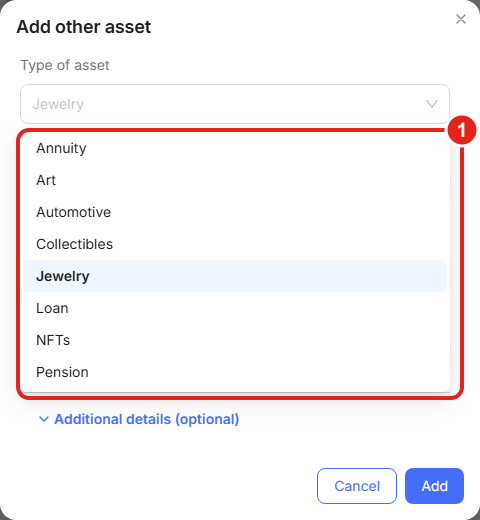
Under Other assets, the Type of asset list (1) includes Annuity, Pension, and Loan. Figures shown are illustrative.
- Enter the details: give it an Asset name, a Net present value (1), the lump-sum value today, and the Monthly payout (2). Then choose Add.
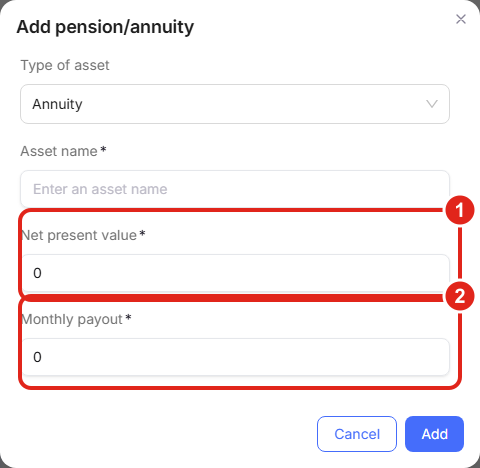
The annuity/pension form captures a Net present value (1) and a Monthly payout (2), so the income is reflected in your net worth and planning. Figures shown are illustrative.
A loan or other debt
To record money you owe, use the same Add other asset form and set Type of asset to Loan for a personal or private loan, or add a mortgage under Real estate when it is tied to a property. Give it an Asset name (1) and an Approximate current value (2). Debt reduces your net worth, so capturing it keeps the total honest. This same form is also where one-off holdings like collectibles or a private note go.
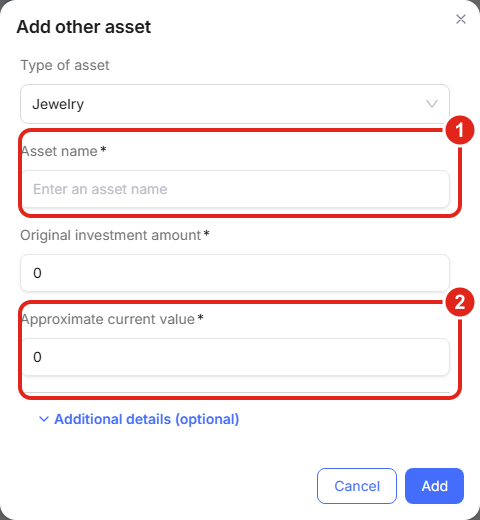
The Other assets form records an Asset name (1) and an Approximate current value (2) for loans and other non-security holdings. Figures shown are illustrative.
When a security is not recognized
If you cannot find a holding, an unusual bond, a foreign listing, an ADR under an unfamiliar symbol, or a proprietary fund, you have two options. You can add it as a custom security and enter the assumptions yourself (as above), or you can attach a proxy: check Use proxy security instead in the Untracked security notice and pick a similar, recognized security (for example, a bond ETF with a comparable maturity and credit quality, or a broad index fund).
PortfolioPilot then analyzes your holding using the proxy's real assumptions until it can map the original. The dedicated walkthrough is Tutorial: Custom Securities & Proxies.
How these holdings show up in your net worth, score, and risk
Once added, these holdings are full participants in your analysis. Fixed income is the clearest example. It appears in your asset-class breakdown, where you can see how much of your portfolio is in Treasuries, corporate, municipal, or mortgage bonds (1).
Because bonds are generally less volatile than stocks, fixed income lowers your portfolio's overall risk and changes your Portfolio Score, in particular your Risk Match, which compares your portfolio's risk to the level you have chosen. Options and hedges, by contrast, are modeled from the higher-risk assumptions you set, so they push risk the other way.
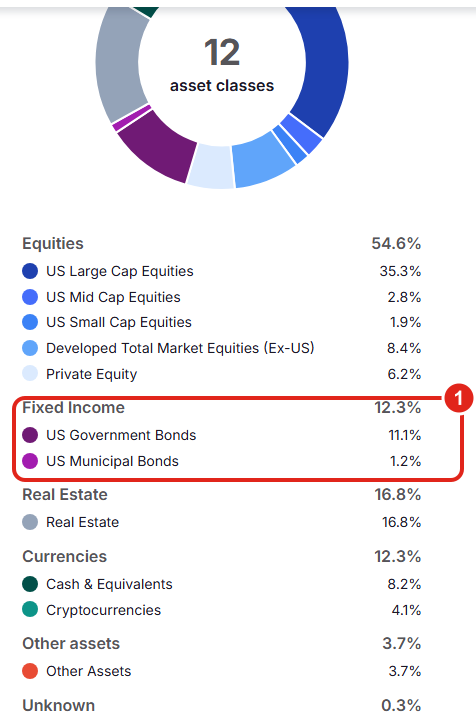
The asset-class breakdown shows your fixed income and how it is split across bond types (1). Adding the bonds and CDs you hold makes this picture complete. Figures shown are illustrative.
These holdings also factor into your recommendations and any rebalancing: PortfolioPilot sees your true allocation, so its suggestions account for the fixed income, options, and other positions you have added rather than ignoring them. Because tax treatment matters for where these holdings belong, it also helps to set each account's tax treatment. See Tutorial: Asset Groups.
Common use cases
A Treasury ladder your brokerage does not import
You hold five individual Treasuries that your connection reports only as cash. Add each one as a fixed-income security (recognized by CUSIP where possible, otherwise custom), so your fixed-income exposure and Risk Match reflect the ladder instead of overstating your cash.
Put options before a volatile period
You buy index puts ahead of an uncertain market. Record them at their premium value with high volatility, then use a Draft Portfolio to confirm the hedge lowers your modeled downside, and a Crisis Simulation to see it in a historical drawdown.
An annuity that anchors your retirement
You have an annuity paying a fixed amount each month. Add it under Other assets with its net present value and monthly payout, so your net worth is complete and your retirement planning counts the guaranteed income.
Why this matters
The holdings people leave out are usually the ones that change the answer: the bonds that lower risk, the options that raise it, the annuity that funds retirement, the debt that offsets assets. Recording them is what turns a rough sketch of your finances into an accurate one, so your Portfolio Score, risk, and recommendations are based on what you actually own. A few minutes of setup buys you analysis you can trust.
Next steps
- Tutorial: Import Your Net Worth. The hub for getting every account into PortfolioPilot: connect, upload, paste, or add by hand.
- Tutorial: Custom Securities & Proxies. The full guide to custom securities, modifying assumptions, and proxies for anything not recognized.
- Tutorial: Portfolio Score. How your fixed income, options, and other holdings move your score, risk, and Risk Match.
- Tutorial: Draft Portfolio. Model a hedge or a rebalance in a safe sandbox before acting.
Global Predictions provides investment advice only through its internet-based application, PortfolioPilot, and only to individuals who are advisory clients of Global Predictions pursuant to written advisory Client Agreements ("Advisory Services"). The publicly available portions of the Platform are provided for educational purposes only and are not intended to provide legal, tax, or financial planning advice. To the extent that any content may be deemed investment advice, such information is impersonal and not tailored to any specific person. Nothing on the publicly available portions of the Platform should be construed as a solicitation, offer, or recommendation to buy or sell any security. All charts, figures, and graphs are for illustrative purposes only. Before investing, consider whether any investment, strategy, security, or transaction is appropriate for you based on your objectives, financial circumstances, and risk tolerance, and consider consulting your legal, tax, or investment professional. Registration does not imply a certain level of skill or training. Investing involves risk. The value of your investment will fluctuate, and you may gain or lose money.
Options, futures, and other derivatives involve a high degree of risk and are not suitable for all investors; you may lose more than your initial investment. Bonds and fixed-income investments are subject to interest-rate, credit, and inflation risk, and their value will fluctuate. Annuities and other insurance products have their own terms, fees, and surrender conditions. This tutorial explains how to record these holdings in PortfolioPilot for tracking and analysis; it is not a recommendation to buy, sell, or hold any of them.
Specific securities, tickers, or identifiers shown in the graphics or examples (including any CUSIP, ETF, or proxy ticker) are for illustrative purposes only and do not represent investment decisions or recommendations made by Global Predictions. Any expected-return, risk, or dividend assumptions you enter for a custom security are your own inputs, not forecasts by PortfolioPilot, and they change the analysis you see.
Case studies and examples presented are hypothetical scenarios intended for illustrative purposes only. They do not represent an actual client, investment, or experience, but rather are meant to provide an example of the intended process and methodology. An individual's experience may vary based on his or her circumstances. There can be no assurance that the Firm will achieve similar results in comparable situations. For more information, see our disclosures at globalpredictions.com/disclosures.
Recording your holdings, bonds, options, annuities, debt, and custom securities, is available on every plan, including Free, so you can always keep your portfolio accurate. The personalized recommendations, rebalancing, and deeper analysis that use these holdings are available to Gold, Platinum, or Pro subscribers, all with a 10-day free, no-credit-card trial.
